About ProPrintDesk

Clear printer guidance for
home & office desks.

ProPrintDesk is an independent HP printer and scanner catalogue built around plain model information, side-by-side comparison, and practical buying guides. We help visitors narrow down devices by everyday function, print engine, and workspace fit.

Every page is organised to make model numbers, device categories, galleries, and pre-purchase checks easy to review before you commit to a printer.

Catalogue Focus HP Printers & Scanners
Built For Home, Study & Office

Support Email support@proprintdesk.com

Who we are

A dedicated place for printer buyers.

ProPrintDesk is not a cluttered general-electronics marketplace. Every page on this site is focused solely on printers, document scanners, and the practical questions that come with choosing the right hardware.

That single focus lets us put exact model identifiers, full supplied photo galleries, side-by-side comparisons, and plain-English buying checklists right where you need them.

Why ProPrintDesk Exists

Comparing printer models often means juggling model numbers, cartridge vs. tank systems, scanning feeders, and desk dimensions across dozens of tabs. ProPrintDesk puts those core categories into one calm, filterable workspace.

Who We Serve

Our catalogue and guides are written for households printing schoolwork and photos, remote workers setting up a home desk, small offices handling daily paperwork, and teams archiving paper records with dedicated scanners.

How We Communicate

We stick to straightforward product language, visible model names, and honest checklists. We never pad listings with unverified speed claims, hidden fine print, or exaggerated promises.

Focused Catalogue

Exclusively HP home inkjets, office inkjets, refillable Smart Tank models, LaserJets, and dedicated ScanJet scanners—grouped cleanly so you can filter without distractions.

Visible Model Facts

Exact model codes, family categories, all-in-one status, catalogue prices, and full supplied galleries stay upfront on every product card and detail page.

Practical Guidance

Original buying guides, Quick View galleries, and a built-in Compare dialog help you weigh two printers side by side before checking final seller terms.

How it works

How we organise the buying path.

A four-step flow designed around real desk routines, transparent model details, and informed comparisons.

1

Define the job

Start with what crosses your desk—everyday documents, colour handouts, photo keepsakes, or regular multi-page scanning.

2

Filter by family

Narrow all 56 models by Home, Office, Ink Tank, Laser, Dedicated Scanner, or All-in-One capability in one click.

3

Compare side by side

Inspect full supplied photo galleries, compare two models directly, and read our matching ProPrintDesk buying guide.

4

Confirm before buying

Use the exact model number to verify replacement ink or toner, dimensions, stock, and warranty terms with your seller.

Printer anatomy

A modern all-in-one printer, explained the way buyers compare it.

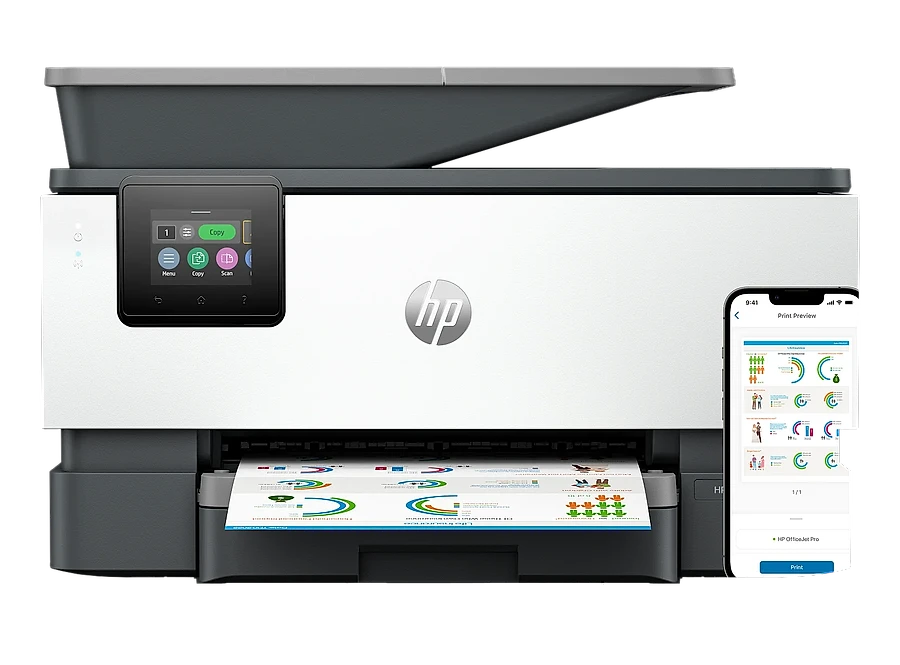
Using the HP OfficeJet 9125e from our catalogue as a visual example, here are the practical hardware areas to check before choosing any desk printer.

Reference Model
HP OfficeJet 9125e
Catalogue Family
Office inkjets
Device Type
Wireless All-in-One Inkjet Printer
Supplied Gallery
5 product views on detail page
Catalogue Price
$309.99 USD
Inspect HP OfficeJet 9125e in catalogue
Top Feeder

Check for an automatic document feeder if you scan or copy multi-page stacks.

Front Display

On-device screen and buttons for quick copy, scan, and wireless status checks.

HP OfficeJet 9125e Wireless All-in-One Inkjet Printer reference diagram
Paper & Output

Measure desk clearance with both input and output trays extended.

Wireless Setup

Confirm laptop, tablet, and phone compatibility across your workspace.

Our standard

What careful curation means at ProPrintDesk.

  • Full HP model identifiers kept visible so you can verify exact manufacturer specifications.
  • Product pages structured for comparison—category, listing type, price, and full supplied galleries.
  • Original buying guides written for everyday users, not jargon-heavy spec dumps.
  • Clear boundary: ProPrintDesk is an independent catalogue and does not claim manufacturer-authorised repair support.
  • No invented reviews, fabricated specs, or hidden sales claims.

Pre-purchase review

Four checks we highlight on every model.

Media & Paper Fit

Confirm supported sheet sizes, photo media, and tray capacity against what you print each week.

Function Match

Verify whether a model is print-only, all-in-one (print, scan, copy), or a dedicated document scanner.

Workspace Footprint

Account for open paper trays, scanner lid height, and cable routing where the device will sit.

Supplies & Seller Terms

Look up exact replacement ink, bottles, or toner and confirm stock, delivery, and warranty before purchasing.

Buyer questions

Built around the questions people actually ask.

A good printer site answers practical ownership questions before you ever narrow your shortlist.

Will this printer fit my workload?

Filter by Home, Office, Ink Tank, Laser, or Scanner and match the device family to your real monthly volume.

Inkjet, Smart Tank, or Laser?

Our Print Technology guide breaks down cartridge flexibility, refillable ink tanks, and crisp laser text in plain terms.

Where do I verify official specs & drivers?

Every model page links to official HP Support so you can confirm OS compatibility, drivers, and supplies by exact model code.

How do I ask a question about a model?

Use our Contact Us page—or click directly from any product page to pre-fill the model name in your enquiry.

Need model guidance?

Tell us how you print. We’ll help narrow the shortlist.

Share whether you need home documents, office reports, photo prints, wireless setup, or dedicated scanning, and explore models built for that routine.

Ready for your next desk upgrade

Your next HP printer
starts right here.

Explore the catalogue